 Social Media Engine Help
Review each channel’s copy in Compose before saving or approving. Separate versions let you adjust one destination without changing the others.
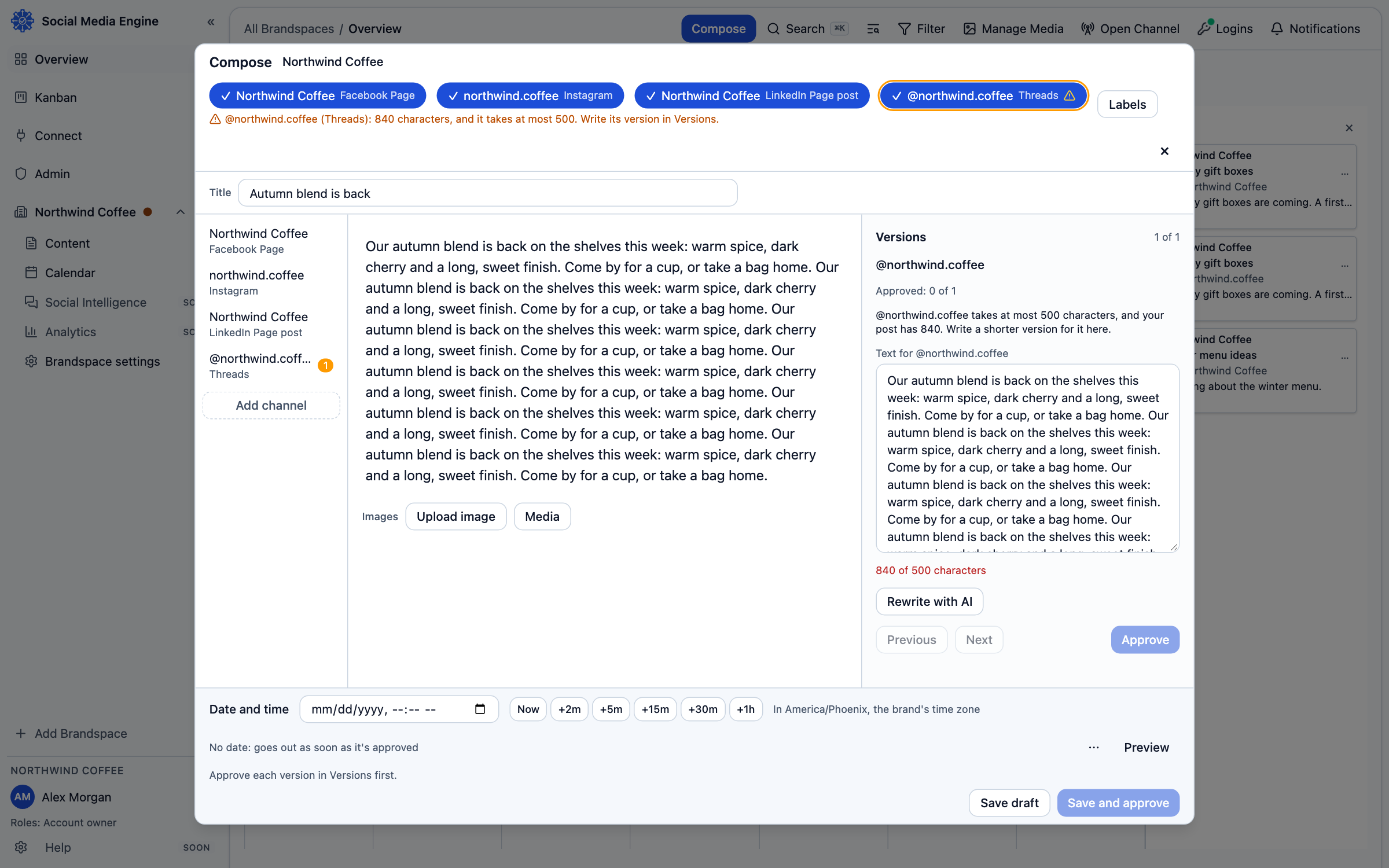
One idea, channel-ready copy
Compose can use shared text for selected channels and separate text where a channel has different limits or formatting. If the original fits a channel, that channel can keep the text as written. If it does not fit, its version can be adjusted while other channels retain their own suitable copy. The channel warning identifies the reason; it does not silently make a shorter version.
- Open the post in Compose.
- Open Versions.
- Select a channel to inspect its text and the character count shown for it.
- Edit the channel version where needed.
- Check Preview for the selected channel before saving.
Use the writing helper only when you choose
Where a channel needs a rewrite, Rewrite with AI can prepare an alternative. Review the result; you can Approve that version or choose Reject or Try again. The tool runs only after you press its button. It does not change other channel versions.